





Understanding Poster Making Machines
In today’s fast-paced world of marketing and communication, the demand for visually striking promotional materials has surged. At the heart of this movement are Poster Making Machines, which enable businesses, educators, and creatives to design and produce high-quality posters efficiently. Whether for advertising campaigns, classroom settings, or personal projects, these machines play a pivotal role in transforming ideas into tangible visual assets. This article delves into the various aspects of poster making machines, guiding you through the types available, their essential features, and how to choose the right one that aligns with your needs.
What Are Poster Making Machines?
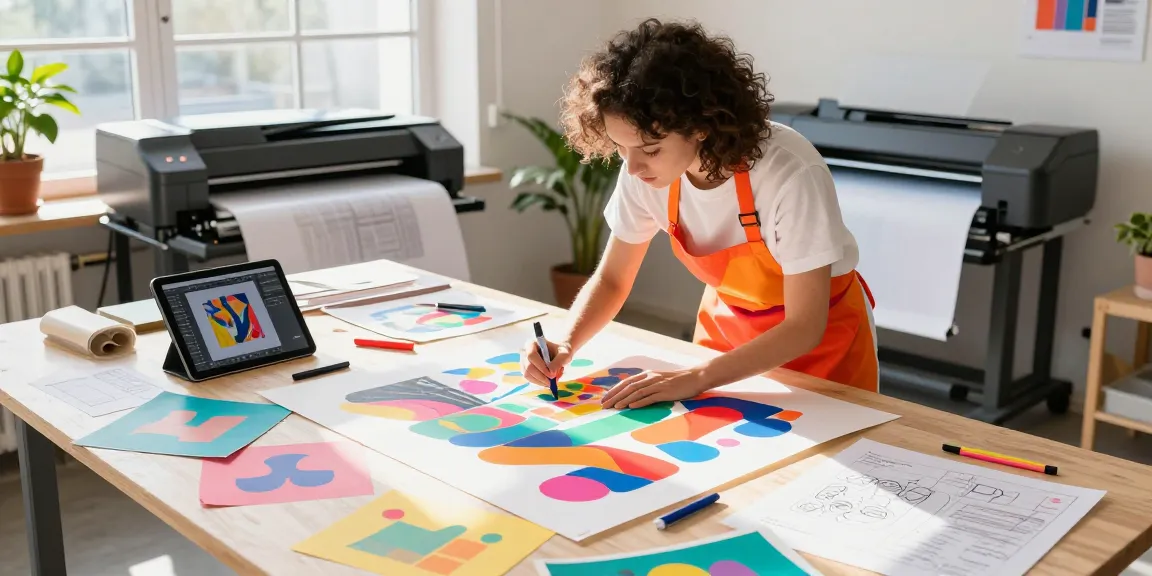
Poster making machines are specialized devices designed to create large-format prints, often used for creating promotional posters, banners, and other visual displays. These machines can vary significantly in size, functionality, and output quality, catering to different user needs—from home-based crafters using compact machines to professional print shops employing advanced industrial models.
Most poster making machines utilize various printing technologies, including inkjet and laser printing, allowing for diverse applications and print materials. With the right machine, users can achieve vibrant colors and precise details that can capture the attention of their target audience.
Types of Poster Making Machines
There are several types of poster making machines to consider, each with its unique features and advantages:
- Inkjet Printers: These are the most common type of poster making machines, known for their ability to produce high-quality prints with vivid colors. Inkjet printers are perfect for detailed graphics and can handle various paper types.
- Large Format Printers: These industrial-grade printers can print on much larger surfaces, making them ideal for professional settings. They often have advanced features that allow for quick production of high-volume prints.
- Vinyl Cutters: These machines are specialized for cutting out shapes and designs from vinyl sheets, enabling the creation of custom graphics and signage. They are often used in conjunction with other printing devices.
- All-in-One Machines: Combining printing, scanning, and copying functions, these versatile machines cater to users with varied printing needs. They are suitable for businesses that require multiple functionalities without investing in several devices.
Key Features to Consider
When selecting a poster making machine, it’s essential to evaluate key features that will enhance your printing experience:
- Print Quality: Look for machines that offer high resolution and color accuracy. The print quality significantly impacts the final appearance of your posters.
- Speed: Depending on your volume of work, consider the speed of the machine. Faster printing can save valuable time, especially in business settings.
- Media Compatibility: Ensure the machine can handle various media types, including different paper sizes and weights, vinyl, and specialty materials.
- Ease of Use: Features such as user-friendly touch screens, mobile printing capabilities, and software compatibility can greatly enhance your printing experience, particularly for beginners.
- Cost of Consumables: Consider ongoing costs, including ink, paper, and maintenance. Understanding these costs upfront can prevent unexpected expenses later on.
Choosing the Right Poster Making Machine
Assessing Your Needs and Budget
Before purchasing a poster making machine, it’s vital to assess your specific needs and budget. Determining the intended use of the machine—whether for occasional home projects or regular business use—will influence your choice. Consider the following:
- Frequency of Use: If you plan to use the machine frequently, invest in a durable, professional-grade model that can withstand high-volume printing.
- Type of Projects: Consider the types of posters you will be creating. If you require intricate designs, a high-quality inkjet or large format printer may be more suitable.
- Budget Constraints: Set a realistic budget that includes the initial cost of the machine as well as the ongoing expenses for supplies and maintenance.
Top Brands in 2026
As technology evolves, certain brands stand out as leaders in the poster making machine market. In 2026, you might consider the following brands known for their quality and innovation:
- Canon: Renowned for its exceptional print quality and user-friendly designs, Canon remains a top choice among graphic designers and businesses alike.
- Epson: Known for its innovative printing technology, Epson offers a range of models suitable for both home users and professionals.
- HP: HP’s large format printers excel in producing high-quality graphics, making them popular among print service providers.
- Roland: As a leader in vinyl printing, Roland offers versatile machines perfect for signage and custom graphics.
Comparative Analysis of Popular Models
The right choice of poster making machine can depend on specific needs. Below is a comparative analysis of three popular models based on performance, features, and price:
- Canon imagePROGRAF PRO-1000: This inkjet printer is favored for its large color gamut and high-resolution prints suitable for photographic quality posters. It’s best for medium to high-volume users.
- Epson SureColor P800: Known for its vivid colors and excellent detail, this printer is ideal for artists and photographers who need quality and precision in their prints.
- HP DesignJet T120: A compact large format printer that offers great value for small businesses needing large prints without the high cost. It is user-friendly and provides high-quality outputs.
Essential Tools and Materials for Poster Making
Best Paper and Inks for Quality Prints
The materials used in poster making significantly influence the final product’s quality. Choosing the right paper and ink can enhance vibrancy and durability:
- Paper: Look for heavyweight poster paper or glossy photo paper designed for inkjet printing to achieve the best results. Consider finishes like satin or matte based on your project’s needs.
- Inks: Opt for high-quality, fade-resistant inks that suit your printer type. Dye-based inks offer vibrant color, while pigment-based inks provide longevity and durability for outdoor use.
Additional Equipment for Effective Design
In addition to a poster making machine, consider these additional tools and equipment to enhance your design process:
- Graphic Design Software: Programs like Adobe Illustrator, CorelDRAW, or Canva can help create stunning visuals tailored to your needs.
- Cutting Machines: If you’re crafting intricate designs, a vinyl cutter or digital cutting machine can add precision to your projects.
- Trimmers and Cutters: Keep your posters neat and professional-looking with high-quality trimmers for straight edges and cutters for detail work.
Eco-friendly Materials and Practices
In today’s environmentally-conscious market, using sustainable materials and practices when making posters is increasingly important. Consider the following:
- Recyclable Papers: Use recycled paper products to produce your prints. Some brands offer eco-friendly options that maintain quality while reducing environmental impact.
- Water-Based Inks: Opt for inks that are not only vibrant but also made from water-based materials to minimize harmful emissions during printing.
- Waste Reduction: Plan your designs to minimize off-cuts and waste, and recycle any leftover materials whenever possible.
Designing Effective Posters
Key Principles of Graphic Design
When designing posters, understanding the key principles of graphic design will help you create visually appealing and effective materials:
- Hierarchy: Use size, color, and placement to guide the viewer’s eye through the poster. Important information should stand out.
- Balance: Ensure your design has a balanced layout, distributing elements evenly across the poster to avoid overwhelming the viewer.
- Contrast: Utilize contrasting colors and font styles for readability and emphasis on key messages.
Incorporating Branding Elements
For businesses, incorporating branding elements into your posters is crucial for recognition and consistency. Consider including:
- Logos: Place your logo in a prominent position to reinforce brand identity.
- Color Schemes: Use your brand colors throughout the design for cohesion.
- Taglines: Include your brand’s tagline or unique selling proposition to communicate your message effectively.
Common Mistakes to Avoid
Designing posters can be challenging, and it’s easy to make mistakes. Here are common pitfalls to avoid:
- Cluttered Designs: Avoid overcrowding your poster with too much text or imagery. A clean, straightforward design is often more effective.
- Poor Font Choices: Use legible fonts and maintain consistency across your design. Avoid using too many different fonts that can distract from the message.
- Neglecting the Audience: Always keep your target audience in mind. Tailor your message and design to resonate with them specifically.
Future Trends in Poster Making Machines
Innovative Technologies on the Horizon
The poster making industry is continuously evolving, with new technologies shaping how posters are designed and produced. Here are a few trends to watch for:
- 3D Printing: Some manufacturers are starting to explore 3D printing for developing posters with unique textures and layered designs, adding a new dimension to visual communication.
- Smart Machines: Integration of AI in poster making machines is emerging, allowing them to learn user preferences and optimize print quality based on previous outputs.
- Cloud-Based Solutions: Increased cloud integration allows for easier access to design files and remote printing capabilities, streamlining workflows for businesses.
Environmental Impact and Sustainability Trends
As awareness of environmental issues grows, the poster making industry is also shifting towards sustainability. Companies are now focusing on sustainable practices, such as:
- Reducing Energy Consumption: Newer models of poster making machines are being designed for energy efficiency, helping to reduce the overall carbon footprint during production.
- Biodegradable Materials: More manufacturers are exploring biodegradable inks and materials for eco-conscious consumers, pushing for a greener industry.
- Recycling Initiatives: Many print companies are adopting recycling programs for used materials and printer cartridges, promoting a circular economy.
Predictions for Poster Making in 2026
Looking ahead to 2026, the poster making industry is expected to see significant advancements in both technology and design practices:
- Enhanced Customization: The ability to easily customize designs using online platforms and tools will likely gain popularity, enabling users to create unique posters tailored to their needs.
- Increased Demand for Interactive Posters: With the rise of digital media, interactive posters that incorporate QR codes or AR elements may become more prevalent, allowing for engaging experiences.
- Continued Emphasis on Sustainability: Companies are likely to prioritize sustainable materials and practices, responding to consumer demand for environmentally friendly products.
What are the benefits of using poster making machines?
Using poster making machines provides multiple benefits, including:
- Cost-Effectiveness: Creating your own posters reduces the need to outsource printing, saving money in the long run.
- Convenience: Having a poster making machine in-house allows for on-demand printing, making it easier to produce materials whenever needed.
- Creative Control: Users can experiment with designs and materials, enabling them to personalize their work to better match their vision.
How to maintain and care for your poster making machine?
To ensure the longevity and performance of your poster making machine, follow these maintenance tips:
- Regular Cleaning: Clean the print heads and nozzles according to the manufacturer’s instructions to prevent clogs and maintain print quality.
- Proper Storage: Store the machine in a dry environment to protect it from moisture and dust which can cause damage.
- Update Software: Regularly update the machine’s software to ensure optimal function and compatibility with your design tools.
Where can I find the best deals on poster making machines?
Finding the best deals on poster making machines involves researching various retailers and online marketplaces. Consider checking:
- Manufacturer Websites: Often, manufacturers offer promotions or discounts on their own sites.
- Online Retailers: Websites like Amazon or specialized print supply stores frequently have competitive pricing and customer reviews to guide your choice.
- Local Print Shops: Some local print shops may sell or offer demos for poster making machines, providing an opportunity to see the equipment in action before purchasing.
Are there any beginner tips for using poster making machines?
If you’re new to using poster making machines, here are some tips to help you get started:
- Read the Manual: Familiarize yourself with the machine’s functions and settings to make the most of its capabilities.
- Start with Simple Projects: Begin by creating simple designs to build your confidence before tackling more complex projects.
- Experiment with Settings: Don’t be afraid to adjust settings like color intensity and print speed to see what works best for your specific materials and designs.
What types of projects can benefit from poster making machines?
Poster making machines are versatile tools suitable for a wide range of projects:
- Promotional Materials: Businesses can create eye-catching posters for marketing campaigns, events, and sales.
- Educational Displays: Schools can utilize these machines to produce educational posters for classrooms and bulletin boards.
- Art and Crafts: Artists can print their designs on various media for exhibitions or personal projects.